How do I use the learning mode on my charging station?
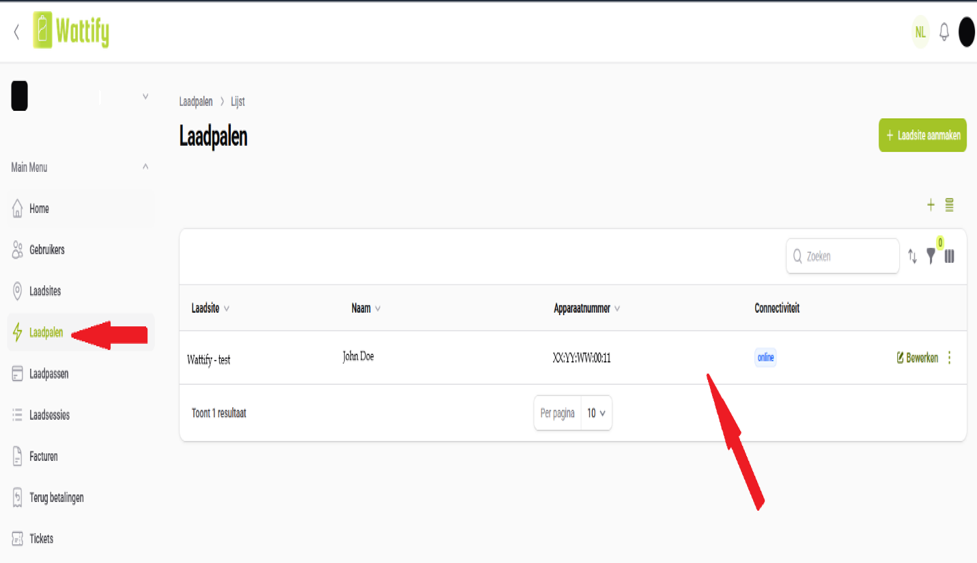
Learning Mode is a feature on charging points that enhances ease of use and safety. Once activated, the charging point records and stores the unique identification numbers of all RFID cards presented to it over the course of the next hour. The vehicle does NOT start charging as soon as an RFID card is presented, allowing you to scan multiple cards in succession. These identifiers are then stored as whitelisted charging cards, specific to that installation. You can find them via your admin portal at mijn.wattify.be, then under ‘Charging Points’, each with an automatically generated name. You can change this name to something more recognisable, such as the user’s name.
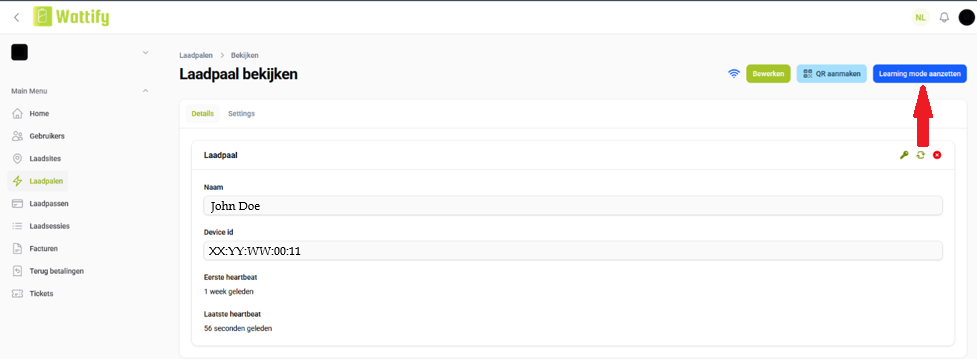
1. Activation – Go to Charging Points, select the desired charging point and enable Learning mode for that charging point.
2. Connect a car – Ensure a car is connected to the charger; without a connected vehicle, Learning Mode will not register anything.
3. Scan badges – Hold the RFID cards/badges against the charger one after the other. The session does not start automatically, so you can scan several cards in succession.
4. Automatic stop – Learning mode records for up to 1 hour; after that, it stops automatically. You can also switch it off manually as soon as all passes have been scanned.
5. Renaming passes – The scanned tags appear under ‘Charging Passes’, each named using the UID and the time of scanning. You can change this name to, for example, the user’s name.
Please note for split-billing accounts: badges added via learning mode are assigned to the ‘employee’ account, not the employer’s account
Related articles
Did this answer your question
Thank you for your feedback
Did not find an answer?
Our team is just an email away and ready to answer your questions